
Develop and leverage your skills
Whether a rapid micro-credential, certificate program, or full college degree, Oklahoma’s career-focused credentials enable you to grow your portfolio of critical workforce skills. Digital badges empower you to own and share evidence of what you accomplish. Find your next opportunity to upskill today!
How to Get Started
Find your perfect program
All program and enrollment questions should be directed to the contact person listed on the individual program page or to your program advisor at your current institution.
Enroll in your program
Enrollment processes vary by program. To enroll in your desired program, visit the program's page, where you will find full enrollment directions. If academic courses are part of the program, you will need to register for* and successfully complete each course. If you have already completed one or more of the required courses or non-credit criteria, you may be able to complete the remaining requirements to earn the micro-credential.
*You will enroll in classes via the institution offering your chosen program. Tuition and fee rates may vary by institution and specific program.
If offered, accept your badge through Credly
Credly is the primary platform used by Oklahoma public colleges and universities for issuing and earning digital badges. Once you complete all of the requirements for your program, which could include submitting evidence of your prior learning or skills to a program coordinator, you can be awarded a digital badge through Credly (if your program was credit-bearing, you will also receive academic transcript notation).
Show off your badge
Congratulations if you have earned a digital badge! Digital badges are credentials that you own, so you can decide how you want to share them.
You will be notified via email (to your .edu account) that your badge is available. For first-time users, the email will prompt you to sign up on Credly.
To immediately share your badge, click on "Accept Your Badge" within that email. You will be directed to Credly's login page. Create an account using your .edu email address. Be sure to also associate your account with your personal email to maintain permanent access to your portfolio of digital credentials.
Once logged in, you will see your badge and the evidence for which you earned it. To share on Facebook, Twitter or LinkedIn, click on the "share" button and select the social media platform(s) of your choice. You will be prompted to allow Credly to access your social media account(s) to post your badge.
What’s a Digital Badge?
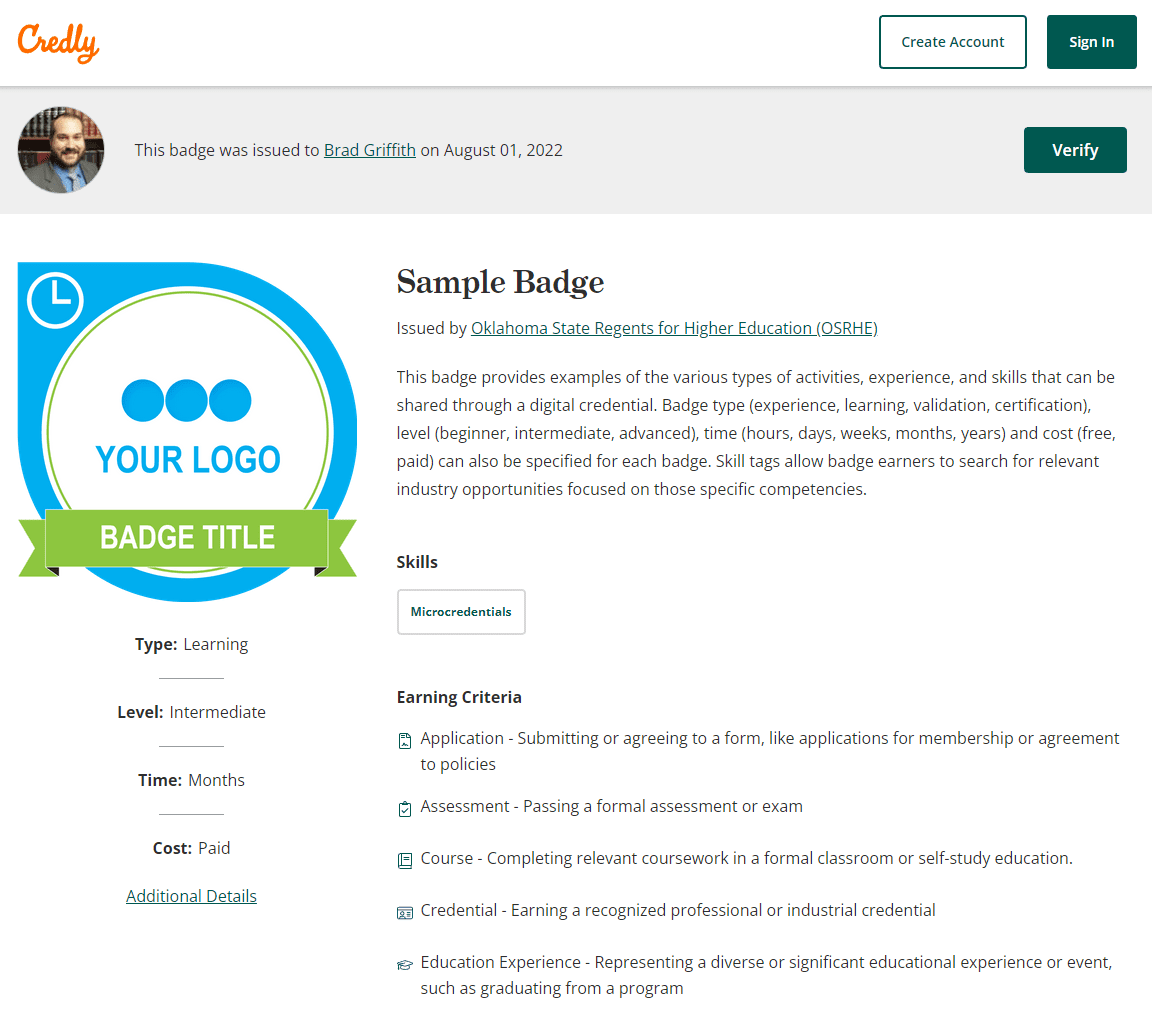
Digital badges help you share the skills you have earned and employers to verify those documented achievements independently. See the image at right of a sample badge and the information it provides when you share it.
When an earner shares a digital badge with an employer, it helps them to:
Showcase Your Skills Through Digital Badging
Once you earn a digital badge, it can be used to share your achievement with employers and on your social media profiles. For more information on how to share your Credly digital badge, view the Credly Badge Earner Guide.
Access and Share Your Badges at Any Time
If you choose not to immediately share your badge, you can log in to your Credly account at any time to access and share your badges. To do so, you must:
- Log into your account.
- Select the badge you'd like to share.
- At the top of the page, select the "share" button.
- You will be brought to the "share badge" screen where you can find different tabs directing you to connect your social media accounts and share your badge.
Sharing Options
There are several ways you can share your digital badge. Once you are logged into your account and have navigated to the Share Badge screen, you will see the following sharing options:
Social media (Facebook, Twitter, LinkedIn, and XING). Select one of these social media platforms and click to connect. You will be prompted to log in to your account.
Email. Select the email tab and you will be prompted to create a message with the subject line "View my verified achievement from the Oklahoma State Regents for Higher Education!"
Link. Select the link tab to copy the badge URL. This URL can be shared on a resume, e-portfolio, website, etc.
Embed code. Select the embed tab, then copy and paste the code to display your digital badge directly on your webpage, blog or anywhere else that accepts HTML.
Download. Select the download tab to download your badge to your computer or other device.
Print. Select the print tab to download a printable certificate that showcases your badge (please note that this option is not available for all badges).
For more information on ways to share your digital badges, please visit the Credly Help Center.
Privacy Settings
You can choose to make your Credly profile - and your individual badges - viewable to the public or viewable only to you. To manage your privacy settings, log in to your Credly account.
To manage profile privacy:
- Click the profile icon in the top right corner of the page.
- Select "settings."
- Select "profile" from the menu on the left.
- Check or uncheck the "make profile private" box toward the bottom of the screen.
To manage badge privacy:
- From your dashboard, select the badge you'd like to manage.
- From the top of the screen, select the "more" icon.
- Select "make badge private."
Please note that if you'd like to share either your profile or a badge, they must be marked public.
Digital Badging Frequently Asked Questions
Q: What is a digital badge?
A: Digital badges are web-enabled versions of a credential, certification or learning outcome which can be verified in real-time, online.
Q: How does my certification get displayed as a badge?
A: OSRHE and many Oklahoma institutions have partnered with Credly to translate the learning outcomes you’ve demonstrated into a badge, issued and managed through a digital badging platform. The technology Credly uses is based on the Open Badge Standards maintained by IMS Global. This enables you to manage, share and verify your competencies digitally. Some institutions might issue badges independently through other platforms such as Badgr.
Q: What are the benefits of a badge?
A: Representing your skills as a badge gives you a way to share your abilities online in a way that is simple, trusted and can be easily verified in real time. Badges provide employers and peers concrete evidence of what you had to do to earn your credential and what you’re now capable of. Credly also offers labor market insights, based on your skills. You can search and apply for job opportunities right through Credly.
Q: How will I know if I’ve earned a badge?
A: You will receive an email notification from Credly (admin@credly.com) with instructions for claiming your badge and setting up your account.
Q: What if I don’t want my badge to be public?
A: You can easily configure your privacy settings in Credly. You’re in complete control of the information about yourself that is made public.
Q: Is there a fee to share or keep my digital badge?
A: No. This is a service we provide to you, at no cost.
Q: What’s to keep someone else from copying my badge and using it?
A: While badges are simply digital image files, they are uniquely linked to data hosted on Credly. This link to verified data makes them more reliable and secure than a paper-based certificate. It also eliminates the possibility of anyone claiming your credential and your associated identity.
Q: Where and how can I share my badge through Credly?
A: You can share your badge directly from Credly to LinkedIn, Twitter, and Facebook; over email; embedded in a website or in your email signature.
Q: What are labor market insights and how can I access them through Credly?
A: Labor market insights are pulled from live job requisitions. Based on your skills you can learn which employers are hiring, what job titles you might be qualified for, salary ranges and more. Search active job listings and even apply for them with just a few clicks through Credly. Access the labor market insights from your badge details page by clicking on Related Jobs, or by clicking on the skill tags assigned to your badge.
Q: Can I export badges issued through Credly to other badge-storing platforms?
A: Yes, you can download your badge from the Share Badge page. Your downloaded badge contains Open Badge Infrastructure (OBI) compliant metadata embedded into the image. This allows you to store your badge on other OBI-compliant badge sites, such as the Badgr Backpack.
Q: Can I import badges issued from other platforms into Credly?
A: Not at this time.